
How do I Configure Phinbox IQ?
The guide explains how to configure Phinbox IQ—available at the partner level with varying support across ConnectWise, Halo PSA, and Autotask—by deploying the Report Phishing Button for each company and enabling company-level integration as of February 10th to analyze reported emails, with detailed setup instructions and support contact options provided.
How do I Configure Phinbox IQ?
This guide walks through how to configure Phinbox IQ.
Phinbox IQ is currently available at the partner level (the ticket icon in the menu)
- Fully supported in ConnectWise (Open Beta)
- Fully supported in Halo PSA (Open Beta)
- Minimal support in Autotask (Closed Beta)
If you're interested, please open a support ticket, reach out to your Phin account contact, or reach out to [email protected].
Setup Instructions
Below are the instructions to set up Phinbox IQ (formerly known as Phin Triage) within
your Phin account.
- If you are looking for a guide to deploy Phinbox IQ as a pod in ConnectWise, go here.
IMPORTANT NOTICES:
As of February 10th, Phinbox IQ will require the company level integration to be turned on for any company whose reported emails should be analyzed by Phinbox IQ. Only having the Report Phishing Button deployed will not be enough to utilize Phinbox IQ in the Phin platform or in a supported PSA.
1. Deploy the Report Phishing Button For Each Company
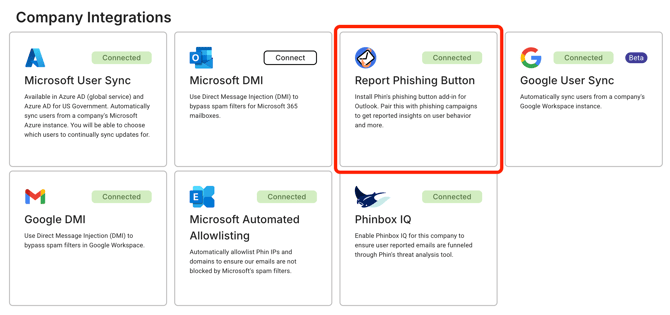
Deploy the Phin Report Phishing Button in each Phin company account if their emails should be analyzed by Phinbox IQ.
- Guide to deploy the Phin Report Phishing Button
- Note: It can take up to 24 hours for the button to show up for end-users.
2. Enable Phinbox IQ For Each Company
To ensure we are able to provide our partners with an option to deploy the Report Phishing button without enforcing those emails to be analyzed by Phinbox IQ, we created a separate integration specifically for Phinbox IQ at the company level. You'll see this on the company integrations page and on the overview tab within the Reporting Phishing integration page.
What are the permissions?
| Exchange Administrator (Entra Role) | This is a Microsoft Entra role, not an API permission. Required to execute Exchange admin operations for triage. |
| RoleManagement.ReadWrite.Directory | Allows Phin to assign the Exchange Administrator role to the application. |
| Exchange.ManageAsApp | Enables app-only Exchange operations and PowerShell execution required for triage actions. |
| User.Read.All | Allows reading user profiles for triage context. |
| Mail.ReadWrite | Allows reading and modifying messages for triage actions (e.g., delete, move). |
| Mail.Send | Allows the app to send mail as any user without a signed-in user. |
| MailboxSettings.Read | Allows reading mailbox settings (e.g., message rules) for triage visibility. |
| ThreatHunting.Read.All | Allows querying Defender for Office 365 hunting data for URL click events and related telemetry. |
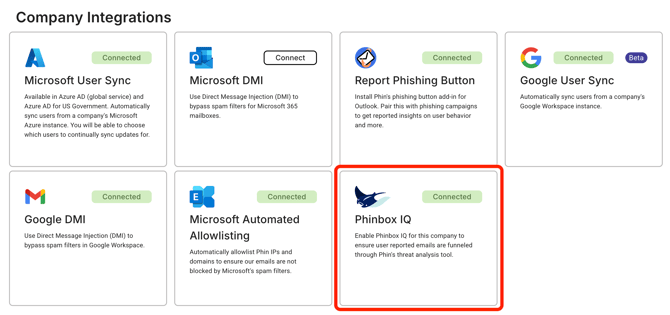
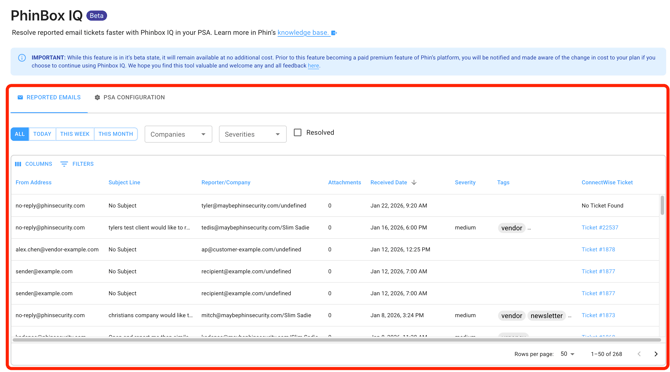
Once you enable this integration for each company, emails reported by Phin's Report Phishing button will be analyzed by Phinbox IQ and stored in the Phinbox IQ reported emails table within your Phin partner account on the Phinbox IQ page.
Knowledge Base
Phin works to update our Knowledge Base with new features with every release. You can read about the platform and its updates here: https://www.phinsec.io/knowledge.
Thanks for using our product!
We use all provided feedback to help drive Phin's development direction. Please keep reaching out and helping us shape the product's future! All ideas are welcome; please keep them coming!
The Dev Team @ Phin
Need help or have an idea for us? Click here!
Was this article helpful?
YesNo
Any additional comments?
Submit