
How to Cancel Training Campaigns
The article explains how to cancel training campaigns on Phin's platform by navigating to the Campaigns section, selecting 'Archive' from the Actions dropdown to end the campaign (which stops future course assignments but does not cancel already launched courses), and optionally deleting the campaign entirely, with the same process applying to shared campaigns.
How to Cancel Training Campaigns
Campaigns can run their course, or maybe it's time to create a new one. Either way, knowing how to cancel a campaign on Phin's platform is important to your success.
When you cancel a campaign, it does not cancel/delete courses that it has already launched, it will only prevent future courses from being assigned.
To cancel the courses it has already launched, you must cancel each of those individually also.
- 1.Start by clicking on Campaigns in the side navigation.
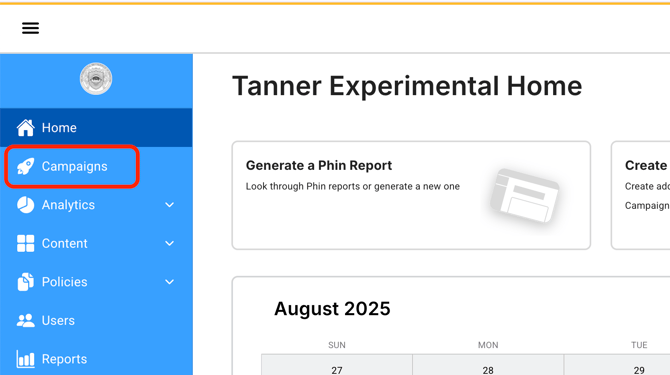
- 2.Now you will see two tables, the first consists of all launched campaigns, the second consists of all active training courses.
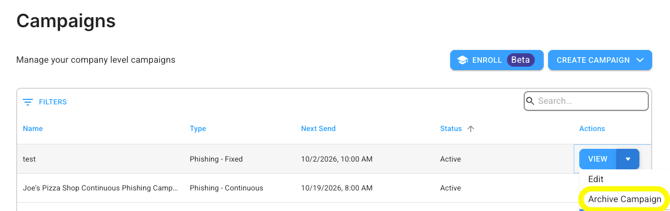
- 3.Under the last column (Actions) in the campaigns table, you should see a 'View' icon, with an drop down next to it. Select 'Archive' to end the campaign.
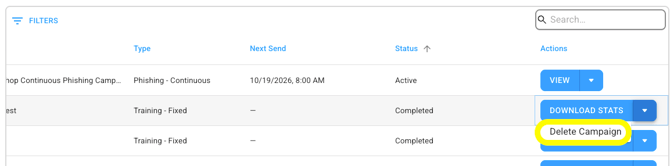
- 1.To fully delete it, go back to that same campaign, click the drop down and select 'Delete'.
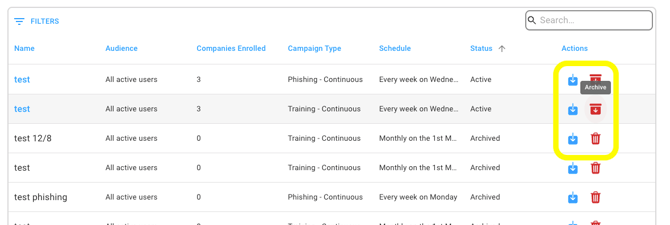
 5. The same rules apply for Shared Campaigns:
 6. Success! You've ended the campaign.
Was this article helpful?
YesNo